
Subpilot
Linerios LimitedFinance
4.11.67K Reviews
- Version
- 1.24.1
- Installs
- 100.00K
- Age Rating
- Everyone
Screenshots
Our Review of Subpilot
 Analysis by Appyee
I tend to notice subscription clutter at the least convenient moment: when checking a bank statement, trying to remember whether a trial is still active, or wondering why a familiar charge has appeared again. Subpilot is aimed at that particular problem. It is a finance app from Finelo Limited, and its focus is narrow by design: helping people keep track of recurring subscriptions and decide what to do about them. That makes it worth considering if your monthly charges have become hard to follow, but it is not a replacement for a full budgeting tool.
What I would decide before installing
The first question is whether you want a dedicated subscription organizer or a broader view of your money. If your main concern is finding recurring payments and remembering renewal dates, Subpilot’s purpose is a close match. If you want to plan a household budget, categorize all spending, or manage savings goals, a general personal-finance app may be a better starting point. I would choose based on the job I need done rather than assuming one app will cover every part of my finances.
It is also worth considering how comfortable you are connecting financial accounts or email to a service. The original setup experience describes syncing these sources to identify recurring charges, which can reduce manual work. But any such connection is a meaningful decision: review the app’s current permissions and privacy details before linking an account, and use manual tracking or another approach if you would rather keep those sources separate. Convenience is valuable, but only when it fits your comfort level.
Subpilot is free to download, with in-app purchases listed from $4.99 to $99.99 per item. That range makes it sensible to inspect the available purchase options and what each one includes before committing. I would first decide whether the free experience handles the subscriptions I need to track, then consider paid options only if a specific feature would save enough effort to justify the cost. It is available to everyone, and the current version is 1.13.1; the app requires Android 8.0 or later.
Getting Started with Subpilot
First things first, downloading and setting up Subpilot was a breeze. Available on both Android and iOS, you can grab it from the Google Play Store or the Apple App Store. After a quick install, I was greeted with a clean and intuitive interface. Nothing too flashy, which is perfect for focusing on what really matters – those pesky subscriptions!
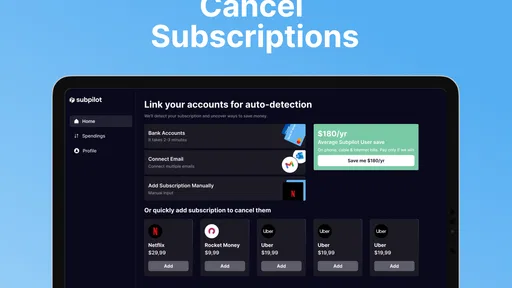
Setting up my account was straightforward. Just a few taps, and I was ready to dive in. What really caught my attention was how easy it was to sync my bank accounts and email. Subpilot automatically scans for recurring charges and subscriptions, so you don't have to manually input them. Talk about a time-saver!
Exploring the Features
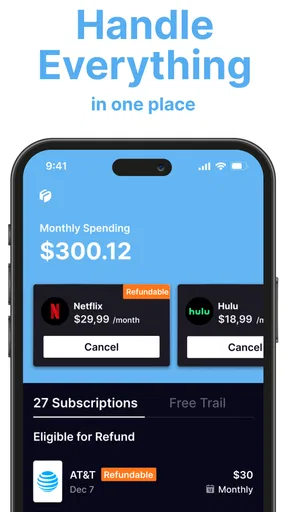
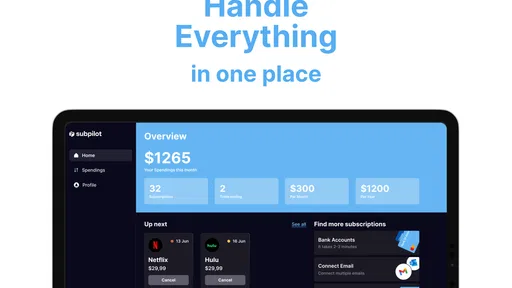
Now, let's get into the meat of the app. The dashboard is super user-friendly. You can see all your subscriptions at a glance, from streaming services to gym memberships. What's cool is the categorization feature. Subpilot neatly organizes your subs into categories like "Entertainment," "Utilities," and "Health & Fitness." This makes it so much easier to track where your money is going.
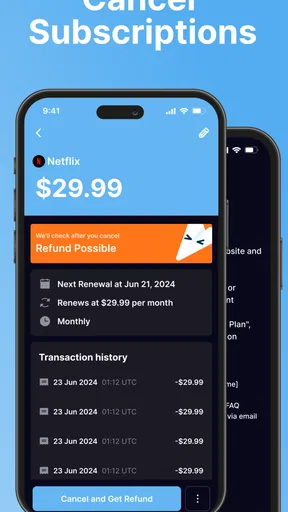
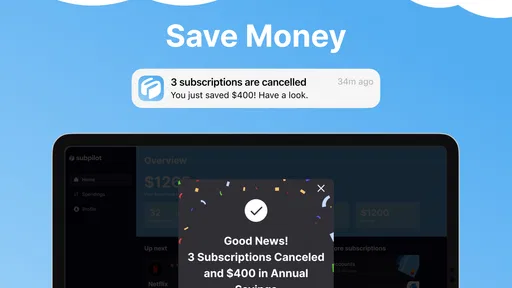
One of my favorite features is the alert system. You can set up reminders for upcoming payments so you never get hit with unexpected charges. No more overdraft fees – hallelujah! Plus, there's the "Cancel Subscription" option. If you see something you no longer need, you can terminate it directly through the app. It's like having a direct line to your subscriptions.
A useful routine for catching forgotten renewals
The most practical way I would use the dashboard is as a review queue, not as something to check every day. For example, after noticing a charge for a video service I barely use, I would look through the subscriptions list, check the next payment reminders, and sort the charges into “keep,” “review,” and “cancel” decisions for myself. That small routine helps separate a payment that is genuinely useful from one I have simply stopped noticing.
I would also check the list after a busy period when I have signed up for short-term services, such as a trial or a temporary fitness membership. The key is to confirm that a payment shown as recurring is still relevant before acting on it. A reminder can prompt a decision, but it cannot know whether a subscription is worth keeping for a particular month. I would treat alerts as timely nudges, then verify the service and renewal terms before cancelling.
There is a useful trade-off in automatic detection. Connecting accounts or email can make discovery easier than building a list from memory, but automatic results still deserve a human check. A recurring transaction might not be a subscription, and a subscription may be billed under a name that is not immediately recognizable. My practical tip would be to match unfamiliar entries against the original service or receipt before changing anything. That extra check is especially important when a charge covers a family plan or a service someone else in the household uses.
Where the app fits among finance tools
Compared with a spreadsheet or a note on your phone, Subpilot can reduce the ongoing chore of entering each renewal by hand, particularly when its account and email scanning identifies charges for you. A spreadsheet still has an advantage for people who want total control over columns, custom labels, or a shared household record. It also works without handing a financial workflow to a dedicated app, though someone has to keep it current.
Compared with a broad budgeting app, Subpilot’s appeal is its specific focus. A budget can show how subscriptions fit into the whole month’s spending, while a subscription tracker is more directly suited to reviewing recurring services and upcoming charges. I would not expect either category to replace the other for every person. If subscription cleanup is the immediate task, a focused app may feel simpler; if the real issue is overspending across groceries, bills, transport, and subscriptions, a wider budget view is more useful.
There is also the simplest alternative: checking bank statements and cancelling through each provider. That route avoids relying on a separate tracker, and it may be enough for someone with only a few predictable payments. Its weakness is that it turns discovery and cancellation into separate manual tasks. Subpilot is most compelling when the time and attention saved by bringing those tasks together matter more than keeping the process entirely self-managed.
Why Subpilot Stands Out
What I really appreciate about Subpilot is its transparency. The app provides detailed information on your spending patterns, helping you to make informed financial decisions. You can even set spending limits for each category. It's all about giving you control.
Another thing worth mentioning is the security. Subpilot uses bank-level encryption to safeguard your data. In today's world, that's a huge relief. I felt confident knowing my information was in safe hands.
And let's not forget the support. The app offers excellent customer service. I had a minor hiccup syncing one of my accounts, but the support team was quick to resolve it. They were friendly and knowledgeable, which made the experience even better.
What I would check before switching
Moving from a personal list or another tracker does not have to mean rebuilding everything at once. I would start by comparing the subscriptions already on my list with what Subpilot detects, then correct anything that is missing or unclear before relying on reminders. This side-by-side check is useful because the first scan is a discovery aid, not a reason to assume every recurring payment has been identified perfectly.
Before cancelling through the app, I would confirm whether the subscription was purchased directly from the service, through an app store, or through another billing route. The cancellation path can depend on how the original plan was started, so a button in a tracker should not replace checking the provider’s confirmation. I would also save any cancellation confirmation or note the effective end date; that is a simple safeguard if another charge appears later.
For a household, the main switching cost may be coordination rather than setup. One person’s dashboard can make recurring expenses easier to review, but it does not automatically settle who owns a subscription or whether another family member depends on it. I would review shared services together before cancelling anything. For an individual with a short, stable list, that process may feel like more structure than necessary; for someone juggling several services, the overview can make the review less haphazard.
Who should choose it—and who should not
I would recommend considering Subpilot if you regularly lose track of renewals, want help spotting recurring payments, or prefer reminders over keeping a calendar full of billing dates. It is also a reasonable fit for someone doing a periodic subscription clean-up who would rather review a categorized list than search through statements one by one. The app has an average rating of 3.9 from 769 ratings, with 196 written reviews and over 10,000 installs; I would treat that as useful context, not as proof that it will suit every account setup or personal workflow.
I would skip it if you have very few subscriptions and already manage them reliably, if you do not want to link the financial or email sources used for detection, or if your priority is a complete budget rather than recurring charges. I would also avoid depending on any tracker as the only record of a cancellation. Keep the provider’s confirmation, and check the next statement when the change should take effect. Those habits matter whether you use Subpilot, a spreadsheet, or no tracker at all.
One question people often have is whether the app can cancel every service for them. Its cancellation option is part of the appeal, but I would still expect the exact steps to depend on the service and how the subscription is billed. Another natural question is whether automatic scanning means no upkeep; I would not treat it that way. A quick review of unfamiliar entries and recently changed plans helps keep the list dependable. Finally, if you are weighing the free download against a paid purchase, I would test the core workflow first and pay only when the specific option offered is genuinely useful to you.
Final Thoughts on Subpilot
In a world where subscriptions can easily get out of hand, Subpilot offers a breath of fresh air. It's user-friendly, efficient, and packed with features that genuinely make life easier. Whether you're trying to cut down on unnecessary expenses or just keep better track of your finances, this app is a must-have.
So, if you're feeling overwhelmed by your subscriptions, give Subpilot a try. It's like having a personal finance assistant right in your pocket. Happy saving!
My recommendation is more measured than “must-have”: I would try it when recurring charges are the problem I want to solve, then judge it by whether the list and reminders make my next review easier. Finelo Limited’s app is focused enough to be approachable, but that focus is also its boundary. Choose a broader finance tool for whole-budget planning, or stick with a manual list if privacy and simplicity matter more than automated discovery. For the right person, Subpilot can turn a vague sense of subscription drift into a concrete set of decisions.
Verdict
Strengths of Subpilot
- User-friendly interface for easy navigation.
- Customizable soundscapes for personalization.
- Offline mode available for uninterrupted use.
- Regular updates with new features and fixes.
- Low battery consumption for extended sessions.
Limitations of Subpilot
- Limited free features; subscription needed.
- Occasional bugs in the notification system.
- Requires account creation to access features.
- Ads can be intrusive in the free version.
- Not all soundscapes are high-quality.
Similar Picks in This Category
View All
Google Wallet
Google LLC4.3

Airtel: Recharge, Bank & Loans
Airtel4.0

PayPal - Pay, Send, Save
PayPal Mobile4.2

DANA Indonesia Digital Wallet
PT Espay Debit Indonesia Koe4.5

Binance: Buy Bitcoin & Crypto
Binance Inc.4.8

Cash App
Block, Inc.4.7
Frequently Asked Questions
What is Subpilot and how does it work?
Subpilot is a subscription management app designed to help users track and manage their various subscriptions easily. By connecting your bank accounts and email, Subpilot identifies active subscriptions, alerts you about upcoming payments, and helps you cancel unwanted services. The app provides a clear overview of your spending, making budgeting more effective.
Is Subpilot secure to use with my financial information?
Subpilot prioritizes user security by employing encryption and secure data storage practices. It connects to your bank accounts through a secure API, without storing sensitive login credentials. Additionally, the app complies with industry standards to ensure your financial information remains private and protected at all times.
Does Subpilot support multiple currencies and international subscriptions?
Yes, Subpilot supports multiple currencies, allowing you to manage subscriptions from various countries. The app automatically converts expenses into your preferred currency, providing a seamless experience for users with international subscriptions. This feature is particularly useful for frequent travelers or those with global service subscriptions.
Can Subpilot cancel subscriptions on my behalf?
Subpilot assists in the cancellation process by providing step-by-step guidance and direct links to service providers. While it cannot cancel subscriptions directly, it simplifies the process by generating cancellation emails and offering tips to ensure successful termination of unwanted services, saving you time and effort.
How often does Subpilot update my subscription information?
Subpilot updates your subscription data regularly to ensure accuracy. It syncs with your bank accounts and email on a daily basis, providing real-time updates and alerts for upcoming payments. This frequent updating helps you stay informed about your subscriptions and avoid unexpected charges.
